Print and mail API for sending {postal letters}

Streamline your letter sending with Pingen’s Letter API. Use our SDKs to start sending letters in minutes via La Poste – with prices from 1.07 € per letter.

Open API documentation
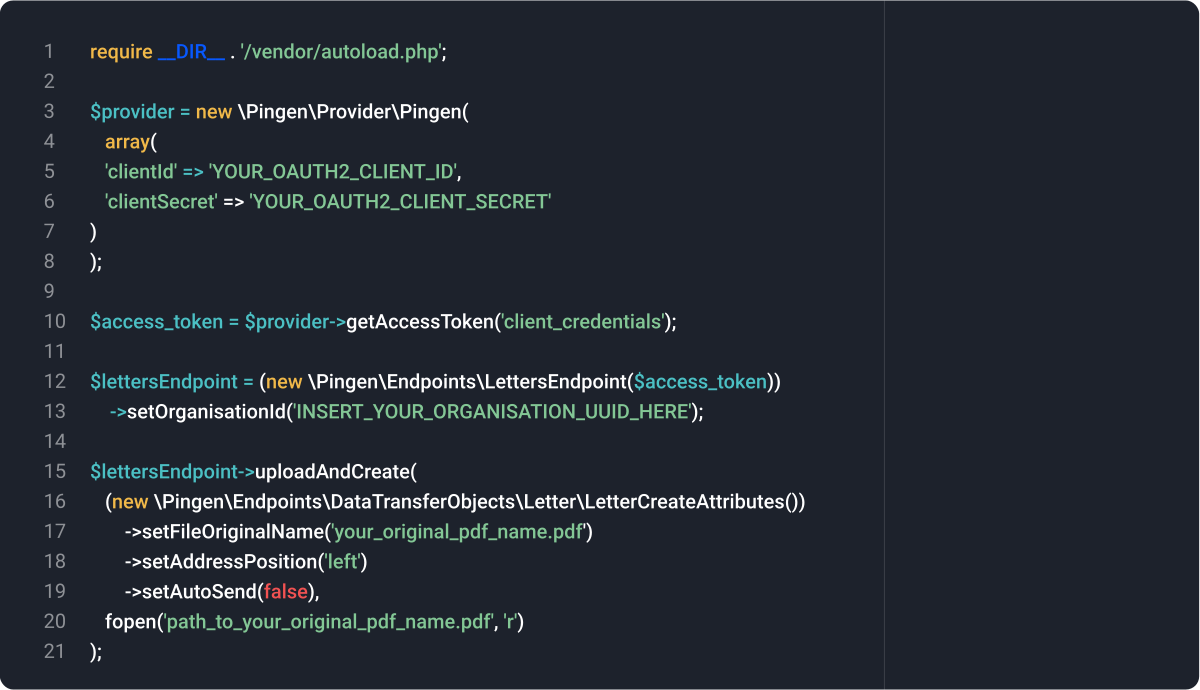
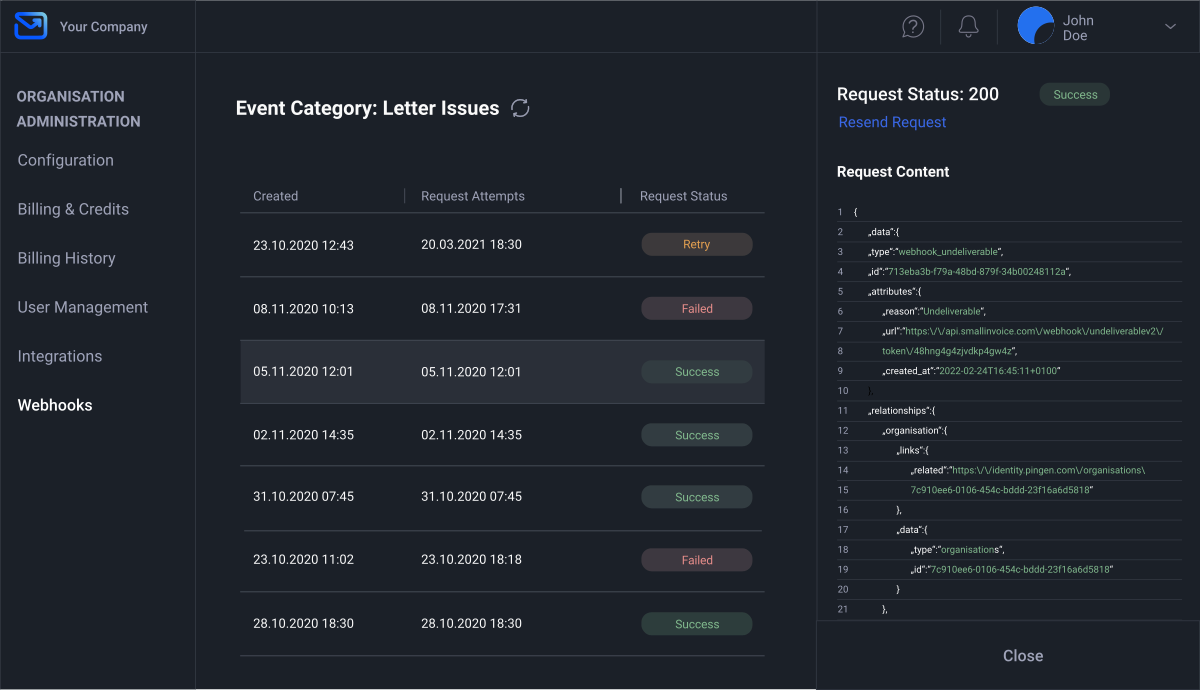
Pingen letter Api - PHP code example and Pingen dashboard

API for print and mail automation

Free of charge

We’re passionate about process automation. That’s why we offer our print and mail API at no cost.

SDKs for many languages

Integrate our API in no time with SDKs for PHP, Python, Go, JavaScript, Java, .NET and Rust.

Seamless scalability

Our high-performance infrastructure enables you to process thousands of letters per hour.

Made for developers

A developer-friendly letter API with clear documentation, crafted by experts for easy integration.

Track & Trace

Pingen offers real-time progress updates and transparency for every letter sent through the API.

Enterprise grade API

Our API supports Idempotency-Key headers, rate limiting as well as configurable send limits.

Easy to set up – simple to use.

Pingen’s letter API is made for flexibility and simplicity, ensuring effortless integration. Alongside user-friendly documentation, we provide code examples for a swift start.

Open API documentation
1
2
3
4
5
6
7
8
9
10
11
12
13
14
15
16
17
18
19
import pingen2sdk

pingen2sdk.client_id = "YOUR_OAUTH2_CLIENT_ID"
pingen2sdk.client_secret = "YOUR_OAUTH2_CLIENT_SECRET"
‍
resp = pingen2sdk.OAuth.get_token(
   grant_type = "client_credentials",
   scope = "letter batch webhook organisation_read",
)
‍
try:
   print(
        pingen2sdk.FileUpload(pingen2sdk.APIRequestor(resp["access_token"]))
        .request_file_upload()
        .data
   )
except pingen2sdk.error.PingenError as e:
   print(e.status_code)
   print(e.json_body)

1
2
3
4
5
6
7
8
9
10
11
12
13
14
15
16
17
18
19
<?php

require __DIR__ . '/vendor/autoload.php';

$provider = new \Pingen\Provider\Pingen(
    array(
        'clientId' => 'YOUR_OAUTH2_CLIENT_ID',
        'clientSecret' => 'YOUR_OAUTH2_CLIENT_SECRET'
    )
);

$accessToken = $provider->getAccessToken('client_credentials');

$lettersEndpoint = (new \Pingen\Endpoints\LettersEndpoint($accessToken))
    ->setOrganisationId('YOUR_ORGANISATION_UUID');

$lettersEndpoint->uploadAndCreate(
    (new \Pingen\Endpoints\DataTransferObjects\Letter\LetterCreateAttributes())
        ->setFileOriginalName('your_filename.pdf')
        ->setAddressPosition('left')
        ->setAutoSend(false),
    fopen('path_to_file.pdf', 'r')
);
1
2
3
4
5
6
7
8
9
10
11
12
13
14
15
16
17
18
19
import json
import requests

url_file_upload = 'https://api.pingen.com/file-upload'
url_letters = 'https://api.pingen.com/organisations/YOUR_ORGANISATION_UUID/letters'
access_token = 'INSERT_YOUR_ACCESS_TOKEN_HERE'

response = requests.get(url_file_upload, headers = {
  'Authorization': 'Bearer {}'.format(access_token),
})
data = json.loads(response.text)['data']
file_url = data['attributes']['url']
file_url_signature = data['attributes']['url_signature']

file = open('path_to_your_file.pdf', 'rb')
requests.put(file_url, data=file)
file.close()

payload = {
  'data': {
    'type': 'letters',
    'attributes': {
      'file_original_name': 'your_filename.pdf',
      'file_url': file_url,
      'file_url_signature': file_url_signature,
      'address_position': 'left',
      'auto_send': False
    }
  }
}

requests.post(
  url_letters,
  json.dumps(payload),
  headers = {
    'Content-Type': 'application/vnd.api+json',
    'Authorization': 'Bearer {}'.format(access_token)
  }
)
1
2
3
4
5
6
7
8
9
10
11
12
13
14
15
16
17
18
19
<?php

$organisationUUID = 'INSERT_YOUR_ORGANISATION_UUID_HERE';
$accessToken = 'INSERT_YOUR_ACCESS_TOKEN_HERE';
$fileOriginalName = 'your_filename.pdf';
$filePath = 'path_to_your_file.pdf';

// Step 1: GET request to retrieve upload URL and signature
$ch = curl_init();

curl_setopt($ch, CURLOPT_URL, "https://api.pingen.com/file-upload");
curl_setopt($ch, CURLOPT_RETURNTRANSFER, 1);
curl_setopt($ch, CURLOPT_HTTPHEADER, [
  "Authorization: Bearer $accessToken"
]);

$response = curl_exec($ch);
if (curl_errno($ch)) {
  echo 'Error:' . curl_error($ch);
  exit;
}
curl_close($ch);

$responseData = json_decode($response, true);
if (!isset($responseData['data']['attributes']['url']) || !isset($responseData['data']['attributes']['url_signature'])) {
  echo 'Failed to retrieve URL and signature.';
  exit;
}

$uploadUrl = $responseData['data']['attributes']['url'];
$uploadUrlSignature = $responseData['data']['attributes']['url_signature'];

// Step 2: PUT request to upload the file
$ch = curl_init();

curl_setopt($ch, CURLOPT_URL, $uploadUrl);
curl_setopt($ch, CURLOPT_RETURNTRANSFER, true);
curl_setopt($ch, CURLOPT_PUT, true);
curl_setopt($ch, CURLOPT_INFILE, fopen($filePath, 'r'));
curl_setopt($ch, CURLOPT_INFILESIZE, filesize($filePath));

$response = curl_exec($ch);
if (curl_errno($ch)) {
  echo 'Error:' . curl_error($ch);
  exit;
}
curl_close($ch);

$data = [
  'data' => [
    'type' => 'letters',
    'attributes' => [
      'file_original_name' => $fileOriginalName,
      'file_url' => $uploadUrl,
      'file_url_signature' => $uploadUrlSignature,
      'address_position' => 'left',
      'auto_send' => false,
    ]
  ]
];

// Step 3: POST request to create the letter
$ch = curl_init();

curl_setopt($ch, CURLOPT_URL, "https://api.pingen.com/organisations/$organisationUUID/letters");
curl_setopt($ch, CURLOPT_RETURNTRANSFER, 1);
curl_setopt($ch, CURLOPT_POST, 1);
curl_setopt($ch, CURLOPT_POSTFIELDS, json_encode($data));

$headers = [
  'Content-Type: application/vnd.api+json',
  "Authorization: Bearer $accessToken"
];

curl_setopt($ch, CURLOPT_HTTPHEADER, $headers);

$response = curl_exec($ch);
if (curl_errno($ch)) {
  echo 'Error:' . curl_error($ch);
}
curl_close($ch);

echo $response;
1
2
3
4
5
6
7
8
9
10
11
12
13
14
15
16
17
18
19
curl \
  -X GET "https://api.pingen.com/file-upload" \
  -H "Authorization: Bearer INSERT_YOUR_ACCESS_TOKEN_HERE"

# Extract data.attributes.url and data.attributes.url_signature from response

curl -X PUT -T path_to_your_file.pdf "INSERT_URL_FROM_INITIAL_CURL_REQUEST"

curl \
  -X POST "https://api.pingen.com/organisations/INSERT_YOUR_ORGANISATION_UUID_HERE/letters" \
  -H "Content-Type: application/vnd.api+json" \
  -H "Authorization: Bearer INSERT_YOUR_ACCESS_TOKEN_HERE" \
  --data-binary @- << EOF
  {
    "data": { \
      "type": "letters", \
      "attributes": { \
        "file_original_name": "your_filename.pdf", \
        "file_url": "INSERT_URL_FROM_INITIAL_CURL_REQUEST", \
        "file_url_signature": "INSERT_URL_SIGNATURE_FROM_INITIAL_CURL_REQUEST", \
        "address_position": "left", \
        "auto_send": false \
      } \
    } \
  }
EOF
1
2
3
4
5
6
7
8
9
10
11
12
13
14
15
16
17
18
19
import (
  "bytes"
  "encoding/json"
  "fmt"
  "io"
  "net/http"
  "os"
)

func main() {
  urlFileUpload := "https://api.pingen.com/file-upload"
  urlLetters := "https://api.pingen.com/organisations/YOUR_ORGANISATION_UUID/letters"
  accessToken := "INSERT_YOUR_ACCESS_TOKEN_HERE"

  // Step 1: GET file upload endpoint
  req, err := http.NewRequest("GET", urlFileUpload, nil)
  if err != nil {
    fmt.Println("Error creating GET request:", err)
    return
  }
  req.Header.Set("Authorization", "Bearer "+accessToken)

  client := &http.Client{}
  resp, err := client.Do(req)
  if err != nil {
    fmt.Println("Error sending GET request:", err)
    return
  }
  defer resp.Body.Close()

  if resp.StatusCode != http.StatusOK {
    fmt.Printf("Failed to fetch file upload data, status: %d\n", resp.StatusCode)
    return
  }

  // Parse the response
  var fileUploadData struct {
    Data struct {
      Attributes struct {
        URL string `json:"url"`
        URLSignature string `json:"url_signature"`
      } `json:"attributes"`
    } `json:"data"`
  }
  if err := json.NewDecoder(resp.Body).Decode(&fileUploadData); err != nil {
    fmt.Println("Error decoding file upload response:", err)
    return
  }

  fileURL := fileUploadData.Data.Attributes.URL
  fileURLSignature := fileUploadData.Data.Attributes.URLSignature

  // Step 2: PUT file to the signed URL
  file, err := os.Open("path_to_your_file.pdf")
  if err != nil {
    fmt.Println("Error opening file:", err)
    return
  }
  defer file.Close()

  req, err = http.NewRequest("PUT", fileURL, file)
  if err != nil {
    fmt.Println("Error creating PUT request:", err)
    return
  }

  resp, err = client.Do(req)
  if err != nil {
    fmt.Println("Error sending PUT request:", err)
    return
  }
  defer resp.Body.Close()

  if resp.StatusCode != http.StatusOK {
    fmt.Printf("Failed to upload the file, status: %d\n", resp.StatusCode)
    return
  }

  // Step 3: POST letter details to the API
  payload := map[string]interface{}{
    "data": map[string]interface{}{
      "type": "letters",
      "attributes": map[string]interface{}{
        "file_original_name": "your_filename.pdf",
        "file_url": fileURL,
        "file_url_signature": fileURLSignature,
        "address_position": "left",
        "auto_send": false,
      },
    },
  }
  payloadBytes, err := json.Marshal(payload)
  if err != nil {
    fmt.Println("Error marshalling payload:", err)
    return
  }

  req, err = http.NewRequest("POST", urlLetters, bytes.NewBuffer(payloadBytes))
  if err != nil {
    fmt.Println("Error creating POST request:", err)
    return
  }
  req.Header.Set("Content-Type", "application/vnd.api+json")
  req.Header.Set("Authorization", "Bearer "+accessToken)

  resp, err = client.Do(req)
  if err != nil {
    fmt.Println("Error sending POST request:", err)
    return
  }
  defer resp.Body.Close()

  if resp.StatusCode == http.StatusCreated {
    fmt.Println("Letter successfully created!")
  } else {
    fmt.Printf("Failed to create the letter, status: %d\n", resp.StatusCode)
  }
}
1
2
3
4
5
6
7
8
9
10
11
12
13
14
15
16
17
18
19
import (java.io.*; java.net.HttpURLConnection; java.net.URL;)
import org.json.JSONObject;

public class UploadAndCreateLetter {
  public static void main(String[] args) {
    String urlFileUpload = "https://api.pingen.com/file-upload";
    String urlLetters = "https://api.pingen.com/organisations/YOUR_ORGANISATION_UUID/letters";
    String accessToken = "INSERT_YOUR_ACCESS_TOKEN_HERE";
    String filePath = "path_to_your_file.pdf";
    String fileName = "your_filename.pdf";

    try {
      // Step 1: Get upload URL
      URL url = new URL(urlFileUpload);
      HttpURLConnection connection = (HttpURLConnection) url.openConnection();
      connection.setRequestMethod("GET");
      connection.setRequestProperty("Authorization", "Bearer " + accessToken);

      int statusCode = connection.getResponseCode();
      if (statusCode != HttpURLConnection.HTTP_OK) {
        System.out.printf("Failed to get file upload URL. HTTP Status Code: %d%n", statusCode);
        return;
      }

      StringBuilder response = new StringBuilder();
      try (BufferedReader br = new BufferedReader(new InputStreamReader(connection.getInputStream()))) {
        String line;
        while ((line = br.readLine()) != null) {
          response.append(line);
        }
      }

      JSONObject data = new JSONObject(response.toString())
        .getJSONObject("data")
        .getJSONObject("attributes");
      String fileUrl = data.getString("url");
      String fileUrlSignature = data.getString("url_signature");

      connection.disconnect();

      // Step 2: Upload file
      uploadFile(fileUrl, filePath);

      // Step 3: Create letter
      createLetter(urlLetters, accessToken, fileName, fileUrl, fileUrlSignature);

    } catch (Exception e) {
      System.err.println("Error occurred: " + e.getMessage());
      e.printStackTrace();
    }
  }

  private static void uploadFile(String fileUrl, String filePath) throws IOException {
    File file = new File(filePath);
    if (!file.exists()) {
      System.err.println("File not found: " + filePath);
      return;
    }

    URL uploadUrl = new URL(fileUrl);
    HttpURLConnection connection = (HttpURLConnection) uploadUrl.openConnection();
    connection.setRequestMethod("PUT");
    connection.setDoOutput(true);

    try (OutputStream os = connection.getOutputStream();
      FileInputStream fis = new FileInputStream(file)) {
      byte[] buffer = new byte[1024];
      int bytesRead;
      while ((bytesRead = fis.read(buffer)) != -1) {
        os.write(buffer, 0, bytesRead);
      }
    }

    int uploadStatusCode = connection.getResponseCode();
    if (uploadStatusCode != HttpURLConnection.HTTP_OK && uploadStatusCode != HttpURLConnection.HTTP_CREATED) {
      System.out.printf("File upload failed. HTTP Status Code: %d%n", uploadStatusCode);
    } else {
      System.out.println("File uploaded successfully.");
    }

    connection.disconnect();
  }

  private static void createLetter(String urlLetters, String accessToken, String fileName, String fileUrl,
    String fileUrlSignature) throws IOException {
    URL url = new URL(urlLetters);
    HttpURLConnection connection = (HttpURLConnection) url.openConnection();
    connection.setRequestMethod("POST");
    connection.setRequestProperty("Content-Type", "application/vnd.api+json");
    connection.setRequestProperty("Authorization", "Bearer " + accessToken);
    connection.setDoOutput(true);

    JSONObject payload = new JSONObject();
    JSONObject data = new JSONObject();
    JSONObject attributes = new JSONObject();

    attributes.put("file_original_name", fileName);
    attributes.put("file_url", fileUrl);
    attributes.put("file_url_signature", fileUrlSignature);
    attributes.put("address_position", "left");
    attributes.put("auto_send", false);

    data.put("type", "letters");
    data.put("attributes", attributes);
    payload.put("data", data);

    try (OutputStream os = connection.getOutputStream()) {
      os.write(payload.toString().getBytes());
    }

    int statusCode = connection.getResponseCode();
    if (statusCode == HttpURLConnection.HTTP_CREATED) {
      System.out.println("Letter created successfully.");
    } else {
      System.out.printf("Failed to create letter. HTTP Status Code: %d%n", statusCode);
    }

    connection.disconnect();
  }
}
Graem Lourens CTO of Pingen

“We like to make things easy for developers – not just during integration, but also in the long run. A happy developer is our best sales strategy.”

Graem Lourens, co-founder and CTO of Pingen

Ready-to-use

Pre-built modules streamline setup and save time.

Simple integration

Intuitive WebApp for quick and seamless API management.

Always up to date

Ensures compatibility with Pingen’s evolution.

Time savings

Minimize development and maintenance efforts.

Various languages

Available for PHP, Go, Python, JavaScript, Java, .NET and Rust.

Clear docs

Clear guides and examples for fast implementation.

Powerful SDKs

Our SDKs simplify postal letter sending via La Poste and other postal providers, with support for a wide range of programming languages.

View our SDK’s

Real-time status updates via webhooks

Pingen provides automatic webhook notifications for key events, delivering real-time updates for each letter. This allows you to react without having to actively monitor the print-and-mail API.

Webhooks examples
Pingen Webhooks dashboard showing undeliverable letters event details with JSON payload and success status

Sandbox environment for developers

Pingen offers a free staging (sandbox) environment that mirrors production. You can simulate the entire mailing process without costs or risks and test every scenario before going live.

Risk-free testing

Use our staging environment to test integrations safely without affecting live data or incurring costs.

Staging environment illustration

Full feature simulation

The staging mirrors all Pingen features, to test workflows, including letter sending and tracking.

Debug before deployment

Identify and resolve issues in a controlled environment before going live, reducing errors in production.

Developer-friendly

Our sandbox is designed for developers to simplify integration testing and accelerate development.

Get started with our letter API

1

Sign up for free

Create a free account to get started with Pingen and receive access to our WebApp and the print and mail API.

2

Get your API key

Create a Developer App in Pingen to receive the Client-ID and Client-Secret required for API authentication.

3

Integrate the API

Use one of the SDKs or create your own integration based on our API documentation and cURL examples.

4

Test and deploy

Test your integration on our staging environment and track the events via the WebApp and webhook notifications.

FAQ

Does Pingen provide letter tracking?

Yes. Pingen provides detailed status updates throughout the mailing process via the API and webhooks, from submission and document processing through to printing and handover to La Poste. For registered letters sent within France, Pingen also provides postal tracking through to delivery. Registered mail with acknowledgement of receipt (LRAR) additionally includes confirmation of receipt and the recipient’s signature.

Which delivery options are available in France through the Pingen API?

For letters sent to recipients in France, Pingen supports Lettre verte, registered mail and registered mail with acknowledgement of receipt (LRAR). Letters are printed locally and handed over to La Poste for delivery. The selected delivery option can be configured as part of your automated mailing workflow.

Does the Pingen API support registered mail?

Yes, Pingen supports sending letters as registered mail to France, Germany, Belgium, Spain, Liechtenstein and Switzerland. Depending on the postal provider, Pingen offers detailed tracking and official proof of delivery for letters sent as registered mail.

Can I send letters internationally through the Pingen API?

Yes, the Pingen API allows you to send letters worldwide. In addition to France also letters to Belgium, Germany, Austria, Spain, the United Kingdom, India, the Netherlands, and Switzerland are printed locally and delivered by local postal providers. For all other destinations, Pingen offers attractive mailing rates through the partnership with DHL. Learn more about mailing options

Does Pingen offer a test environment for API integrations?

Yes. Pingen provides a free staging environment that mirrors the production environment. Developers can test their API integration, letter workflows, tracking and webhooks without letters being physically printed or sent. This makes it possible to develop and validate an integration safely before moving to production. Access the staging environment

Which SDKs are available for the Pingen API?

Pingen provides SDKs for popular programming languages including PHP, Java, Python, JavaScript, Go, Rust, and .NET, making it easy to integrate postal letter sending via La Poste into your application. Links to all available SDKs can be found in the Pingen API documentation

Is the Pingen API suitable for enterprise applications?

Yes, the Pingen API is designed for reliable and scalable business use. It supports features such as Idempotency-Key headers, rate limiting, configurable send limits and real-time webhook notifications. Combined with GDPR-compliant data processing and a dedicated staging environment, these features make it suitable for integrating high-volume postal mailing into business-critical workflows.

How does the Pingen API differ from La Poste APIs?

The Pingen API provides a single integration for automating postal mail in France and internationally. Letters sent to recipients in France are printed locally and handed over to La Poste, while the same API can also be used for local production and postal delivery in multiple other countries. This allows businesses to manage domestic and international letter sending through one API rather than integrating separately with individual postal providers.

You're viewing our website for France, but it looks like you're in Other countries.